RaspberryPi 4 4GB Supreme Pro Retropie Pixel Desktop Interface

One of the best things about owning a raspberry pi is the ability to run it like a pc. Supreme Pro give us the option of a 32 bit or 64bit operating system. Besides running retro games today’s video covers the desktop Pixel and the many features it offers. 1080p youtube stability Libre and other office programs.

Supreme pro base image
https://www.arcadepunks.com/download-…

Programming Arduino Dice Roller from Scratch! [1/3]

In this Arduino live-coding series you will learn how to program your own dice roller project! We’ll write the code together, from scratch, solving interesting challenges, and I will explain every step and show you how to create clean, readable Arduino code.


Part 1: https://youtu.be/HaFf48j5sMc
Part 2: Will be released April 13th
Part 3: Will be released April 16th

RG350M Review- All Metal New Screen Is it Worth Buying?

In this video, we take a look at the new RG350M an all-aluminum variant of the Original Rg350 with a new IPS screen and button Layout Is it worthing buying or upgrading too from the old RG350? Let’s find out.
The New RG350M uses the same Dual Core  JZ4770 1.0 GHz CPU as the Original Rg350 and it has the same amount t of Ram so performance should be the same. It’s able to play PS1, SNES,Neo Geo, NES, Gameboy advance, PC engine, MAME and many many more.
With an upgraded MIPIS Dual Core 1.0Ghz JZ4770,521MB Ram 3.5 inch IPS Screen Dual analog Sticks, Mini HDMI Out and USB Type C This is looking like an awesome little Handheld emulation/Retro console.

Single Board Computer + GTX 1650 Can it Game? ODYSSEY / ReComputer SBC

In this video I wanted to see if we could get an external GPU working on the all-new SEEED STUDIO ODYSSEY – X86J4105800, The Most expandable Win10 / Linux Mini PC with 8GB RAM. Powered by the Intel J4105 Quad-Core CPU with 8GB of LPDDR4 and 64GB’s of Emma 5,1 storage. So I stuck a Low profile GTX 1650 on this little board using an M.2 to PCIe X16 Adapter! Can it Game? Let’s find Out

Help FIGHT COVID-19 With Your RaspberryPi With Rosetta@home

In this video, I show you how you can help fight the Corona Virus / COVID-19 using a Raspberry Pi by installing and running Rosetta@home! Rosetta@home is used to predict the structure of proteins important to the disease as well as to produce new, stable mini-proteins to be used as potential therapeutics and diagnostics. Basically, we are donating our Raspberry Pi’s CPU cycles / Power to help aid in the fight! It’s like Folding@Home but it works on the Raspberry pi.

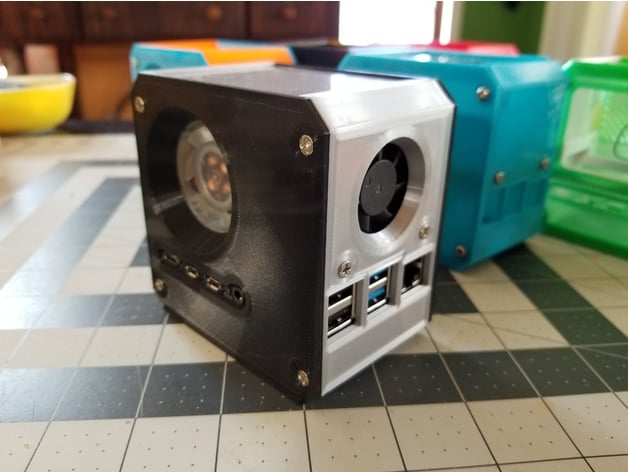
RaspberryPi 4 Mini Desktop Case – Ice Tower Cooler + Secondary PCB Cooling Fan

This is a case I designed for the Raspberry Pi 4 with the Ice Tower Cooler by 52Pi.

I designed this during the coronavirus quarantine and in some ways influenced by this ongoing experience.

For one, there’s potentially hours of experimentation potential as there are different fan options to test… if you’re stuck at home bored with nothing to and a spare Raspberry Pi and some fans sitting around.

Furthermore, since supply shipments are sketchy, I kept the 3D printer filament usage to a minimum, thinned parts wherever possible, provided opportunities to fabricate some parts out of other household materials (like possibly cardboard for the top and bottom panels which are not structural and otherwise featureless).

Read more… (and download the STL)

More pics and write up…